


Video: Forget
Posted by Starlight86 | inspiration art, video of the week
I enjoyed watching this clip. Incredible work by Vania Oliveira, Moritz Reichartz and Michael Fragstein. More information HERE.
Forget from Michael Fragstein on Vimeo.
Software: Colorpix
Posted by Starlight86 | software
I recently found a nice color picker application and I like it very much. ColorPix is a free color picker for Windows. It has some cool features like built-in magnifier up to 1600%, copy color value directly to the clipboard, and you can minimize ColorPix to the system tray, and keep it out of the way until you need it. Best of all, there's nothing to install - just download the tiny app and off you go. So grab it now, it's FREE! Download it HERE.
Website: Myoats.com
Posted by The Albino1 | design, website application

Remember to follow me, on twitter at www.twitter.com/mattsomethin.
Gimp Quick Tip: Adding Stroke to Text
Posted by The Albino1 | gimp tips
Here's my first Gimp Quick Tip for the blog. How to add a colored stroke around text! This can be used to add definition to text, and make it stand out more. So here's how to do it.
1. Add text to your document. A bolded font looks good with a stroke around it.
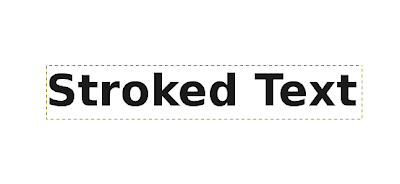
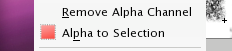
2. On the text layer, right click, and press "Alpha to Selection". This will create a selection around the text that will be used to create the stroke
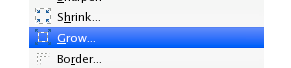
3. After the selection is made, go to Select>Grow. Chose your grow amount, and the selection will grow.
4. Create a new layer below the text layer, and fill the selection with the stroke color. Deselect and there you have it, your newly stroked text!

Hope this tip helped you, and don't forget to follow me on twitter at http://www.twitter.com/mattsomethin.
Gimp Quick Tip: Keep Aspect
Posted by Starlight86 | gimp tips
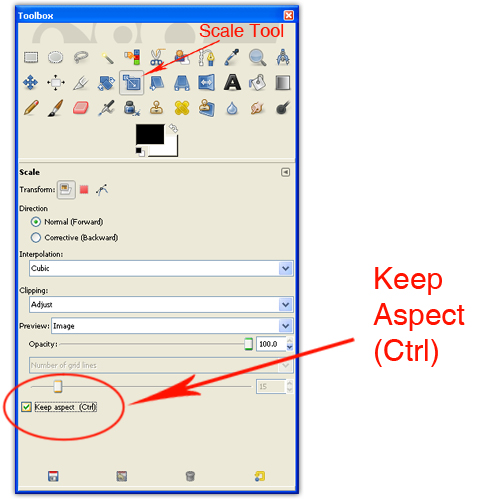
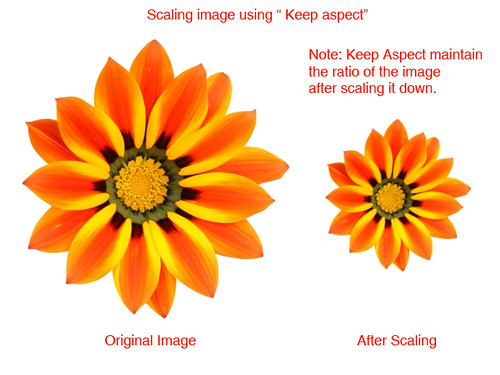
One of the most basic transformations in Gimp is capable of scaling an image. To scale an image / graphic, we go to Image > Scale Image or select the Scale tool in toolbox. Often times, you’ll find it necessary to constrain the proportions of your objects when scaling.
Constraining Proportions while Scaling in Gimp
Holding down the Ctrl key while scaling maintain the ratio of the image. Another way to maintain the ratio of the image without holding the Ctrl key is by selecting the keep aspect box.
Constraining Proportions while Scaling in Gimp
Holding down the Ctrl key while scaling maintain the ratio of the image. Another way to maintain the ratio of the image without holding the Ctrl key is by selecting the keep aspect box.
Video: Dominoes Everywhere
Posted by Starlight86 | video of the week
Dominoes Everywhere from Jared Lyon on Vimeo.Cool Dominioes video from Jared Lyon. Quoted ; "This video was created for Imagine RIT, an annual festival at Rochester Institute of Technology focused on creativity and innovation of its students, faculty, and staff. It was created by myself and two coworkers.The cardboard man at the beginning who kicks the first domino is RIT President Bill Destler, who started the annual festival at RIT in 2008.Inspiration for the video came from some of my favorite videos including the Sony Bravia balls, paint, and rabbits commercials; the Honda cog commercial; the Guinness 'Tipping Point' commercial; and all of FlippyCat's domino videos on YouTube." -Jason Lyon.
Print: Official Classic Printed Poster
Posted by Starlight86 | poster
Budapest-Hungary based Official Classic produce some very nice poster work and I’m definitely a fan of their poster work; There’s more poster over Official Classic site. Image via Behance.Official Classics spawned from the minds of two young enthusiastic graphic designers Mark Zador and Attila Horvath.


Gimp Quick Tip!!
Posted by Starlight86 | gimp, gimp tips, gimp tutorials
I have create a new section in my blog called Gimp Quck Tips and these little tips are meant to help some people that are learning Gimp. I hope you enjoy this new section and if you have some question regarding Gimp, you can leave a comment here, or send me a direct tweet.
Gimp Quick Tip: Reset Tool Option in Gimp
Posted by Starlight86 | gimp tips
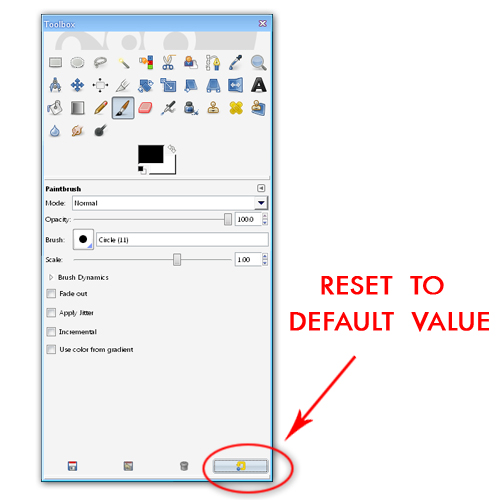
Hello everyone, today I want to share a quick workflow tip how to reset tool option without restarting Gimp. This tip could come in handy for some gimp beginner. You can reset all tool options to default value by clicking the reset button at the toolbox itself (see the picture).
Delicious Link: 35 Tutorials to create amazing Vector Graphics using Inkscape
Posted by Starlight86 | inkscape


